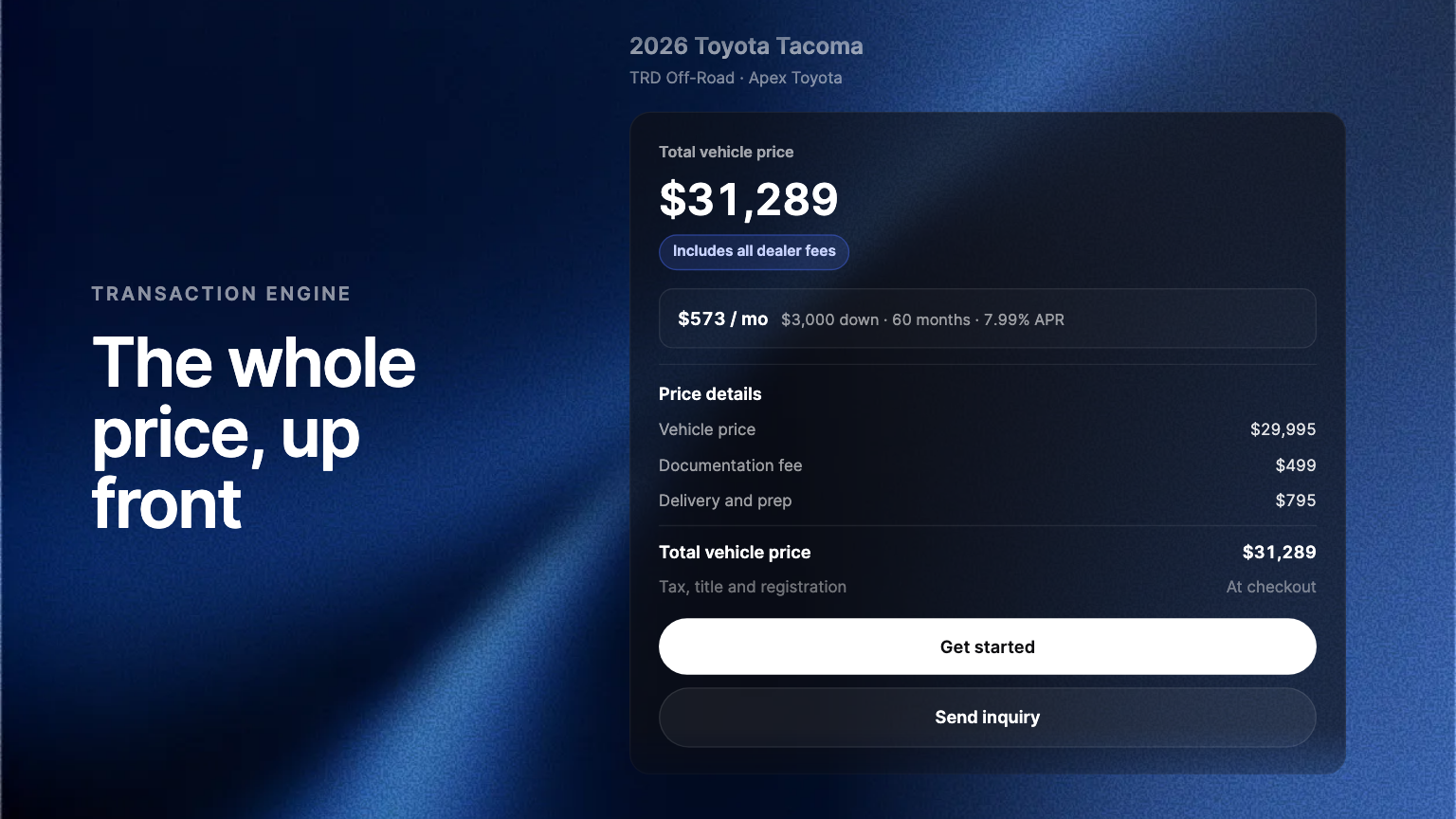
Every vehicle page headline is now the total vehicle price with your dealer fees inside it, the price the FTC's pricing FAQs ask dealers to advertise. Payments are worked out from that total, and a Price details section shows the same receipt as checkout.
In September the FTC published its pricing FAQs for dealers, and the answer to the question every dealer was asking was short. The advertised price is the price any consumer can walk in and pay, with every dealer-required charge inside it, and there is no grace period. As of this week, every vehicle page on a Transaction Engine storefront advertises that number. You do not have to change a setting.
The headline is the whole price
The price at the top of every vehicle page is the total vehicle price: your advertised price with the dealer fees you have set up already in it. Only the charges a government sets, sales tax, title and registration, sit outside it, which is where the FTC draws the line. The FTC's own example is a $40,000 vehicle with an $85 doc fee, advertised at $40,085. That is the number your page shows.
Payments follow the same number
The monthly payment, the down payment and the payment calculator are all worked out from that total. The payment a shopper sees is a payment on the price they will actually pay, not on a sticker that leaves your fees out.
The receipt behind the number
A Price details section lays out the vehicle price, each of your fees and the total, line for line, exactly as the checkout receipt does. Nothing changes between the vehicle page and the purchase, so there is no moment where the shopper finds a fee they were not shown.
Never a price without your fees
While your fees load, the price waits for them. If a fee cannot be priced, the page reads Pricing on request instead of showing a number without it. A vehicle page never advertises a price a shopper cannot pay.
Why it matters now
The standard reaches every place a price appears, and the vehicle page is where a shopper decides. The major listing sites now badge or rank listings by whether fees are disclosed, and a shopper who has to ask what a vehicle really costs has been given a reason to ask somewhere else. A dealer whose vehicle pages already show the whole price does not have that conversation.
Where to find it
Open any vehicle page on your storefront. The headline uses the dealer fees you already have set up in the Admin Portal, so a fee you add there reaches every vehicle page. For the full picture, read our guide to out-the-door pricing and what the FAQs say about who owns the advertised price.
Frequently asked questions
No. Every vehicle page on your storefront shows the whole price, using the dealer fees you already have set up. Add a fee in the Admin Portal and every vehicle page includes it.
It covers the vehicle pages on your Ekho storefront. The FTC's standard reaches every place you advertise a price, so check that your ads, listings and signs carry the same number.